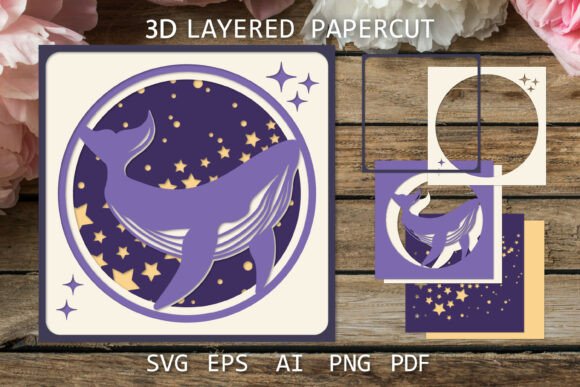
Layered Papercut Whale 3D Shadow Box
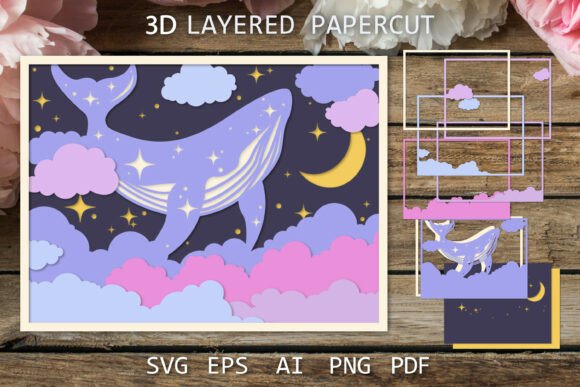
There is a unique magic in transforming flat paper into a window of depth. The Layered Papercut Whale 3D, Shadow Box design captures this essence perfectly, offering creators a way to bring the vastness of the ocean and the mystery of space into a tangible, framed experience. Unlike traditional two-dimensional art, this project relies on the interplay of light, shadow, and distance to create an illusion of volume. When you look at a finished piece featuring a whale swimming through a starry night sky, your eye travels from the foreground stars to the distant silhouette of the creature, creating a dynamic visual journey that feels alive.
This specific design is not just about cutting shapes; it is about understanding spatial relationships. The "Whale in the Space" concept merges two powerful themes: the deep ocean and the infinite cosmos. Both environments share a sense of isolation, wonder, and scale. By layering these elements, the artwork invites viewers to lose themselves in the details. For hobbyists and professional designers alike, this template serves as a robust foundation for exploring depth perception without needing advanced modeling software or expensive materials.
Understanding the Depth of Layered Paper Craft
The appeal of a Layered papercut lies in its simplicity and its complexity. On the surface, the process involves stacking cut pieces of paper. However, the result depends entirely on precision and planning. Each layer acts as a distinct plane in the composition. In the case of the whale design, the background might feature a deep blue or black gradient representing the void of space or the deep sea, while subsequent layers introduce constellations, bubbles, or smaller marine life before culminating in the main subject: the whale.
What makes this particular 3D Shadow box SVG file so useful is its separation of elements. The files are provided with both colored and black-separated layers. This separation allows for flexibility in material choice. You can print everything on standard cardstock for a quick prototype, or you can use the black-and-white separated layers to cut each element from different colored papers manually. This approach ensures that the final product has rich color contrast and distinct edges, which are crucial for maintaining the 3D effect when backlit.
Lighting plays a pivotal role in how these designs are perceived. A shadow box is designed to be illuminated from behind. As light passes through the transparent areas of the paper, it casts shadows from the upper layers onto the lower ones. This creates a soft, glowing atmosphere that mimics bioluminescence in the deep ocean or the faint glow of distant stars. The high-quality raster and vector files included in the download ensure that even the smallest details, like individual stars or texture on the whale's skin, remain crisp when cut.
Creative Applications Beyond the Frame
While the primary application for this design is a decorative wall piece, the versatility of the digital files opens up numerous other creative avenues. Adults aged 20 to 50, including entrepreneurs and educators, often look for projects that can serve multiple purposes. Here is how you can adapt the Layered Papercut Whale 3D for various contexts:
- Custom Greeting Cards: Instead of a large frame, scale down the design to fit a premium greeting card. Use the layered technique to create a pop-up effect where the whale appears to swim out of the card. This is perfect for birthdays, anniversaries, or sympathy cards where a message of depth and connection is needed.
- Educational Tools: Educators can use the whale and space theme to teach concepts of biology, astronomy, or physics. Students can assemble the layers to understand perspective, or teachers can use the finished art to spark discussions about marine conservation and the universe.
- Interior Decor for Small Businesses: Cafes, bookstores, and boutique hotels often seek unique decor that sets a mood. A series of these shadow boxes, perhaps varying the colors to match a brand palette, can transform a waiting area into an immersive environment.
- Digital Assets for Designers: Graphic designers can import the SVG files into their own projects. The separated layers allow for animation in video editing software, creating a parallax scrolling effect for websites or social media content.
The ability to modify the design is key to making it your own. Perhaps you want to change the background from a starry night to a coral reef. Since the files include EPS10, AI, and PDF formats, you have the freedom to alter colors, rearrange layers, or combine elements with other assets. This adaptability ensures that the project remains relevant regardless of your specific aesthetic goals.
Technical Considerations for Best Results
To achieve a professional finish, it is essential to work with the right tools and settings. The download includes SVG Files, which are ideal for laser cutters and vinyl plotters like Cricut or Silhouette. These machines interpret vector paths with high precision, ensuring that intricate details like the stars in the night sky are cut cleanly without tearing the paper.
If you are using a laser cutter, remember that the speed and power settings must be calibrated to the thickness of your paper. Too much power will scorch the edges, ruining the clean look required for a shadow box. Conversely, too little power may leave uncut lines. The PNG Files provided are excellent for previewing the design on screen or for printing if you plan to hand-cut the pieces. The high-resolution raster images ensure that the printed guide is accurate.
When assembling the box, spacing is critical. If the layers are too close together, the shadows will merge, flattening the image. If they are too far apart, the focus may be lost. A common rule of thumb is to space layers approximately 1/4 to 1/2 inch apart, depending on the size of the frame. Using foam tape or small wooden spacers can help maintain consistent gaps between the whale, the stars, and the background.
Adapting for Different Audiences and Goals
For the entrepreneur looking to sell these as physical products, consistency is vital. Customers expect a polished final item. Using the provided templates ensures that every piece you produce maintains the same proportions and quality. You can offer customization options, such as choosing the frame color or the type of paper (e.g., textured watercolor paper vs. smooth cardstock), to add value to your offering.
Bloggers and content creators can use the process of creating this art as a narrative device. Documenting the journey from digital file to physical object provides engaging content for tutorials, time-lapse videos, or written guides. The "Whale in the Space" theme resonates well with audiences interested in mindfulness, nature, and creativity, making it a strong topic for social media engagement.
For the hobbyist, the project offers a satisfying blend of challenge and relaxation. It requires focus during the cutting and assembly phases but results in a calming, beautiful object for your home. Whether you decorate your room with a single large piece or create a gallery wall of smaller variations, the impact is significant. It transforms a blank wall into a conversation starter.
Practical Tips for Success
Before you begin, ensure you have the correct software to open the files. The package contains EPS10 and AI files, which require Adobe Illustrator or compatible vector software. If you do not have these, the SVG files can often be opened in free alternatives like Inkscape. Remember that this is a digital download; no physical items are sent. The colored previews are strictly for visualization, and the fonts used in any mockups are not editable or included.
Always test your design on a scrap piece of paper first. This allows you to check the nesting of the layers and the clarity of the cut lines. If you find that certain details are too fine for your machine, you can adjust the line weight or simplify the pattern slightly within the vector software. Do not hesitate to experiment with different paper textures; a matte finish often absorbs light better than glossy paper, enhancing the shadow effect.
Finally, keep your workspace organized. With multiple layers and small pieces like stars, losing a component can be frustrating. Label your cut pieces according to the layer order immediately after cutting. This small step saves time and prevents errors during assembly.
The Layered Papercut Whale 3D, Shadow Box is more than just a craft project; it is an exercise in creativity, patience, and technical skill. By leveraging the high-quality files provided, you can create stunning visual experiences that captivate and inspire. Whether you are building a business around paper crafts or simply seeking a meaningful weekend project, this design offers a reliable path to beautiful results.