Lucky in Love Dice Ornament SVG: A Guide to Creating Romantic Keepsakes
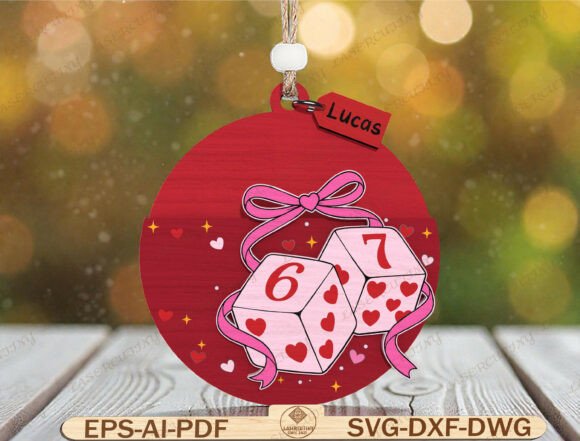
The concept of taking a chance on love is timeless, and few designs capture that sentiment as playfully as the Lucky in Love Dice Ornament SVG. This digital design features a romantic round bauble centered around a pair of dice with heart-shaped pips, tied together with a delicate ribbon bow. Surrounded by tiny hearts and stars, it serves as a perfect symbol for Valentine's Day gifts, anniversary keepsakes, or even personalized car charms for couples. For creators using laser cutters like Glowforge or xTool, or vinyl cutters like Cricut, this file offers a layered design intended to create a subtle 3D effect. However, owning the file is only the first step; understanding how to handle it correctly ensures your final product looks professional rather than amateur.
Understanding What You Are Actually Buying
One of the most common misunderstandings in the world of digital crafting is the expectation of physical delivery. When you purchase the Lucky in Love Dice Ornament SVG, you are buying a digital download. No physical ornament will be shipped to your door. This distinction is crucial for managing expectations regarding shipping times and inventory. The value lies entirely in the versatility of the files provided: SVG, DXF, EPS, AI, PDF, and DWG formats. These formats ensure compatibility with LightBurn, CNC routers, and various other laser machines.
Many beginners make the mistake of assuming a single file format works for every machine. If you own a Cricut Maker but try to open a DWG file without converting it, you will face immediate frustration. Conversely, if you are running a high-end laser engraver, relying solely on an SVG might limit your ability to utilize specific vector paths required for deep cutting. Always verify which software your specific hardware prefers before downloading. For instance, LightBurn often handles DXF and SVG files exceptionally well, while Adobe Illustrator requires AI or EPS for maximum editability. Choosing the wrong format can lead to distorted lines, lost layers, or wasted material.
Avoiding Common Design and Layering Errors
The description highlights a "layered design for 3D effect," which is a key selling point. However, achieving this look requires careful attention during the setup phase. A frequent error creators make is flattening all layers into a single path before cutting. If you merge the dice, the ribbon, and the background hearts into one solid shape, you lose the depth that makes this ornament special. The charm of the Lucky in Love Dice Ornament SVG comes from stacking these elements—perhaps cutting the base from wood, the dice from acrylic, and the ribbon from felt—to create visual interest.
To avoid this, inspect your file immediately after importing it into your design software. Look for separate groups or layers labeled for the different components. If the file appears as a single flat image, you may need to ungroup the elements or use the "Release Compound Path" function in your software. Another oversight involves the customizable name tag included in the pack. Many users forget to resize the text box or fail to kern their lettering properly before sending the job to the cutter. If the text is too large for the tag area, it will be cut off; if it is too small, it becomes illegible. Always preview the design at 100% zoom to ensure the font size matches the physical dimensions of your chosen material.
Material Selection and Cutting Settings
Choosing the right material is just as important as the design itself. Because this ornament features intricate details like tiny hearts, stars, and heart-shaped pips inside the dice, not all materials will yield good results. Using a thick, dense wood like oak for the fine details of the ribbon bow can result in burnt edges or broken tips. Similarly, using a dark-colored acrylic without adjusting your laser power settings can obscure the white heart pips, making them invisible against the background.
A practical approach is to test cut on scrap material first. For the delicate ribbon and tiny stars, thinner materials like 3mm birch plywood or colored cardstock often work better than heavy hardwoods. If you are aiming for a premium wedding favor, consider using clear acrylic for the dice and a contrasting color for the hearts. This contrast enhances the visibility of the design. Furthermore, do not ignore the kerf—the width of the material removed by the laser blade. If you plan to assemble the ornament with interlocking parts, failing to account for kerf can result in pieces that are too tight to fit or too loose to stay together. Adjusting your offset settings in LightBurn or similar software can save hours of assembly time.
Maximizing Value for Personalized Gifts
The true potential of the Lucky in Love Dice Ornament SVG shines when you personalize it. The included customizable tag allows you to add a name, date, or short message, transforming a generic craft into a cherished memory. A common mistake here is choosing a font that is too decorative or thin for the cutting method. Script fonts with very fine lines can break easily during the cutting process or get lost in the grain of the wood. Opt for bold, clean typefaces that remain legible even when scaled down to the size of a small bag tag or car charm.
Additionally, think about the context of the gift. For a Valentine's Day present, pairing the ornament with a red velvet pouch elevates the presentation significantly. For wedding favors, ensuring the names on the tags are spelled correctly and the dates are accurate is non-negotiable. Double-check your text layer before committing to the cut. One typo can ruin a batch of fifty ornaments, leading to wasted time and money. By treating the customization phase with the same care as the cutting phase, you ensure the final product communicates the intended emotion effectively.
Final Checks Before You Cut
Before you hit the start button on your machine, perform a final review of your workspace and file integrity. Ensure your material is secured tightly to prevent shifting, which can blur the fine details of the heart pips. Check that your lens is clean, especially if you are working with reflective materials like certain plastics, as a dirty lens can cause inconsistent cutting depths. Finally, verify that your file resolution is high enough for the scale you intend to produce. While SVG files are vector-based and theoretically infinite in resolution, low-quality raster images embedded within the file can pixelate when enlarged.
The Lucky in Love Dice Ornament SVG is a versatile tool for anyone looking to add a touch of romance to their crafting projects. By avoiding common pitfalls related to file formats, layer management, material selection, and personalization, you can create high-quality, professional-looking items that truly resonate with recipients. Whether you are a hobbyist making a single gift for a partner or a small business owner producing wedding favors, attention to detail is the difference between a cute craft and a masterpiece. Take the time to prepare your files and test your settings, and your creations will speak volumes about the thoughtfulness behind them.